 draftkeyDownload for Mac
 Your words, close to home
Local AI writing.
On your own Mac.
DraftKey runs autocomplete and rewriting on your Mac. Your draft stays on-device for AI inference, while model downloads, licensing, and updates use separate online services.
Apple Silicon · macOS 14 or later · 8 GB memory for AI
What does local AI writing mean?
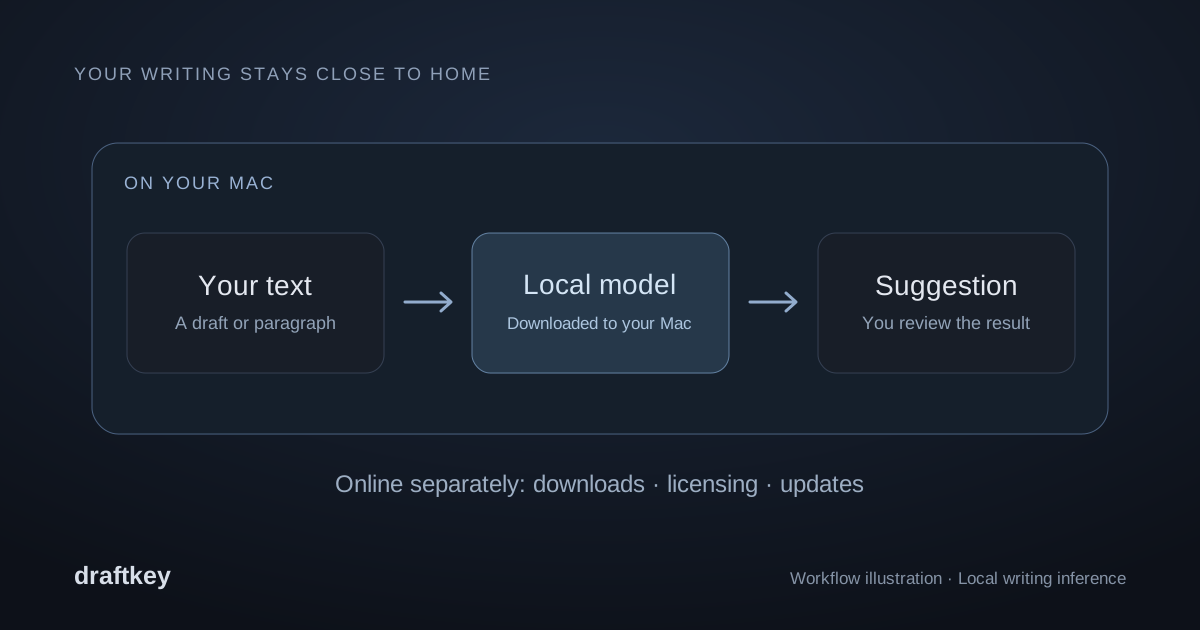
A local writing assistant runs its model on your computer. In DraftKey, your current text is processed on your Mac to generate a suggestion. The writing engine does not upload that text to a cloud AI inference service.
Autocomplete suggests the words that might come next. Rewriting changes a paragraph or selected passage according to your instruction. Both use the downloaded writing model, and both need you to review the result for meaning and accuracy.
This is different from a writing service that sends your draft to a remote model. It also means your Mac supplies the memory, storage, and processing power. DraftKey needs Apple Silicon, macOS 14 or later, and at least 8 GB of memory for AI. The model download is approximately 1.12 GB; allow at least 2.2 GB of free space plus room for the app.
What works locally, and what uses the internet?
After the writing model is downloaded, autocomplete and rewriting generate their suggestions locally. Local inference describes the writing engine; it does not mean the entire product has no network connections.
| Activity | Where it happens | What to expect |
|---|---|---|
| Autocomplete and rewrites | On your Mac | Your writing is processed by the downloaded model. |
| Model download | Online, from Hugging Face | Setup needs an internet connection and free disk space. |
| Purchase and activation | Online services | Payment and licensing involve transaction and activation information. |
| App downloads and updates | Online, through GitHub | Downloads and update checks use ordinary connection metadata. |
| Website typing room | In your browser | Typing text is processed locally; preferences and best scores use browser storage. |
The privacy notice explains the information handled by these services. For example, local inference does not prevent a hosting provider from receiving the normal request information needed to deliver a download.
You choose where writing help is active
DraftKey uses macOS Accessibility to interact with compatible text fields. That access lets it work alongside your editor. Compatibility depends on how the editor exposes its text; some custom editors are not supported, and secure fields are excluded.
Use per-app controls to choose where DraftKey is active. Sounds, autocomplete, and rewriting have independent controls, so you can enable just the parts you want. You can also review the app’s permissions in macOS System Settings.
If a field does not respond, follow the text-field troubleshooting steps. Do not assume that a field is compatible just because the surrounding app opens on your Mac.
When is local writing a good fit?
DraftKey may suit you if you write on a supported Mac, want short suggestions or edits inside compatible text fields, and prefer your draft to stay on your computer during inference. You can also use keyboard sounds independently of the writing features.
Check your workflow before relying on it: your Mac must meet the requirements, your editor must expose compatible text fields, and the model needs time and space to download. Local processing does not guarantee that a suggestion is correct, or that an app satisfies your workplace’s data-handling rules.
Try the prepared website examples to understand the interaction. Those examples are not a live model benchmark and do not predict the exact response you will get in the Mac app.
Common questions about local AI
Does DraftKey send my draft to a cloud model?
No. The current autocomplete and rewriting engine processes your writing on your Mac. Content you choose to email for support is separate support correspondence.
Can I start using AI without downloading the model?
The Mac writing features need the separate model download. Clicking Get started in the app begins it in the background. The website uses prepared examples and does not download or run that model.
Does local AI mean I never need internet access?
No. Downloading the app and model, activating a license, and checking for updates use online services. Local inference means the writing itself is processed on your Mac.
A little help, close to home.
Check the requirements and get your Mac ready.